mesh = TriMesh.read_obj("../test_meshes/disk.obj", dim=2)
hemesh = HeMesh.from_triangles(mesh.vertices.shape[0], mesh.faces)
geommesh = GeomMesh(mesh.vertices, mesh.face_positions)Warning: readOBJ() ignored non-comment line 3:
o flat_tri_ecmctopology: Topological modifications in half-edge meshesOne often needs to modify mesh connectivity. In half-edge meshes, there are several “elementary” mesh modifications. For triangulax, by far the most important one is the edge flip (see below). It is the only modification that preserves the number of all mesh elements, and is thus most “JAX compatible”.
Design note: for JIT-compatibility, none of the topology modification functions (flip_edge, collapse_edge, split_vertex) check in advance whether they will produce a valid mesh. Separate functions (can_flip_edge, can_collapse_edge, can_split_vertex) are provided for this purpose: call them before the modification if you need to guard against invalid operations.
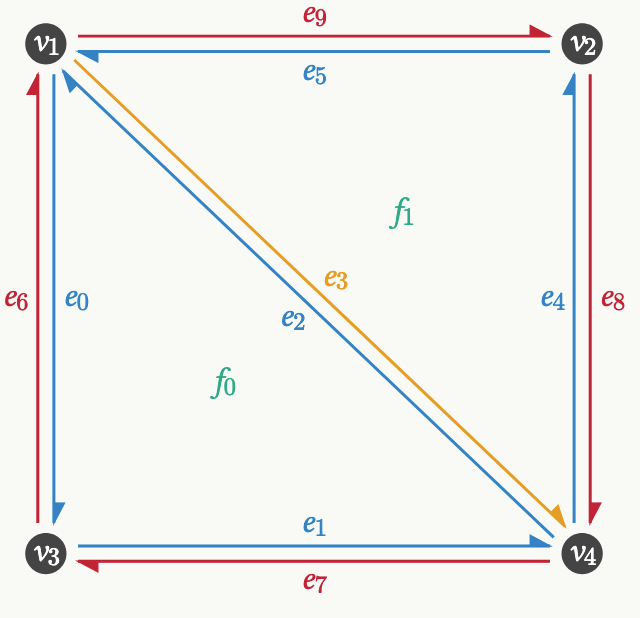
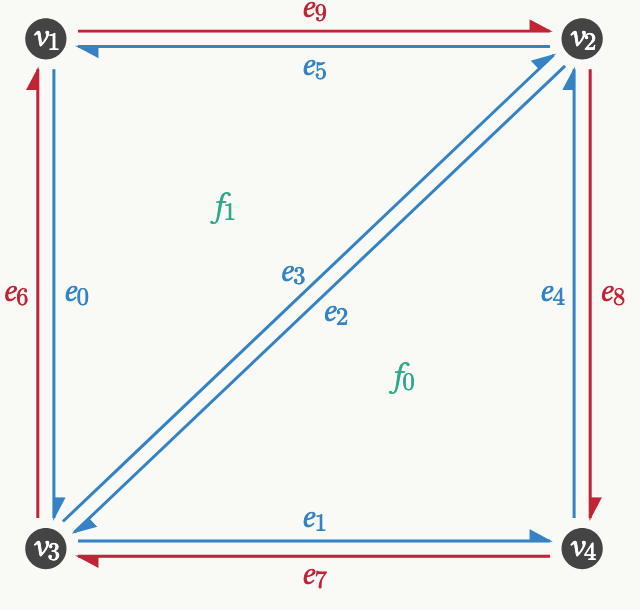
In our simulations, cells will exchange neighbors (T1-event). In the triangulation, this corresponds to an edge flip. We now implement the edge flip algorithm for HeMeshes. We basically edit the various connectivity arrays (in a JAX-compatible way).
The algorithm (and the naming conventions in flip_edge) are from this webpage.
Before
After
def flip_edge(
    hemesh:HeMesh, e:Union
)->HeMesh:
Flip half-edge e in a half-edge mesh.
See https://jerryyin.info/geometry-processing-algorithms/half-edge/. The algorithm is slightly modified since we keep track of the origin and destination of a half-edge, and use arrays instead of pointers. Returns a new HeMesh, does not modify in-place.
Warning: does NOT check whether the flip produces a valid mesh. Flipping a boundary edge silently corrupts the connectivity, because heface == -1 wraps around and overwrites the last face. Always screen with can_flip_edge first; the batch helpers flip_all / flip_by_id / flip_n_shortest do this for you.
Not jitted: wrap in jax.jit yourself if desired (e may be a traced value).
mesh = TriMesh.read_obj("../test_meshes/disk.obj", dim=2)

hemesh = HeMesh.from_triangles(mesh.vertices.shape[0], mesh.faces)
geommesh = GeomMesh(mesh.vertices, mesh.face_positions)
Warning: readOBJ() ignored non-comment line 3:
o flat_tri_ecmcplt.triplot(*geommesh.vertices.T, hemesh.faces)
ax = plt.gca()
p = msh.cellplot(hemesh, geommesh.face_positions,
cell_colors=np.array([0,0,0,0.1]), mpl_polygon_kwargs={"lw": 1, "ec": "k"})
plt.gca().add_collection(p)
plt.axis("equal")(np.float64(-1.10003475),
np.float64(1.09628575),
np.float64(-1.09934025),
np.float64(1.09050125))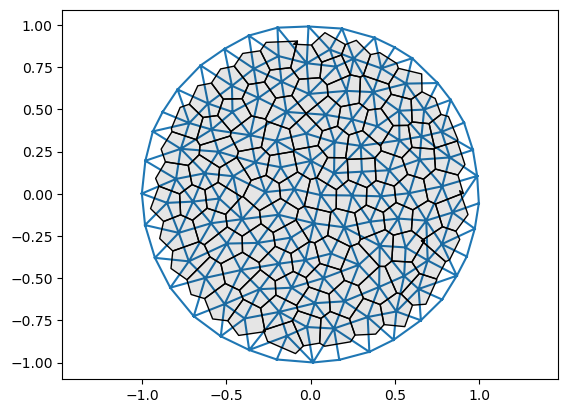
# flip edge and recompute face positions

flipped_hemesh = flip_edge(hemesh, e=335)
flipped_geommesh = geom.set_voronoi_face_positions(geommesh, flipped_hemesh)
# connectivity is still valid
igl.is_edge_manifold(hemesh.faces)[0], igl.is_edge_manifold(flipped_hemesh.faces)[0], flipped_hemesh.iterate_around_vertex(100)(True, True, Array([298, 299, 630, 632], dtype=int32))# you can see the flipped edge between vertices 126-117 in the plot below (middle right)
fig = plt.figure(figsize=(8,8))
plt.triplot(*geommesh.vertices.T, hemesh.faces)
plt.triplot(*flipped_geommesh.vertices.T, flipped_hemesh.faces)
ax = plt.gca()
p1 = msh.cellplot(hemesh, geommesh.face_positions,
cell_colors=np.array([0.,0.,0.,0.]), mpl_polygon_kwargs={"lw": 1, "ec": "k"})
p2 = msh.cellplot(flipped_hemesh, flipped_geommesh.face_positions,
cell_colors=np.array([0.,0.,0.,0.]), mpl_polygon_kwargs={"lw": 1, "ec": "tab:orange"})
ax.add_collection(p1)
ax.add_collection(p2)
plt.axis("equal")
msh.label_plot(geommesh.vertices, hemesh.faces, fontsize=10, face_labels=False)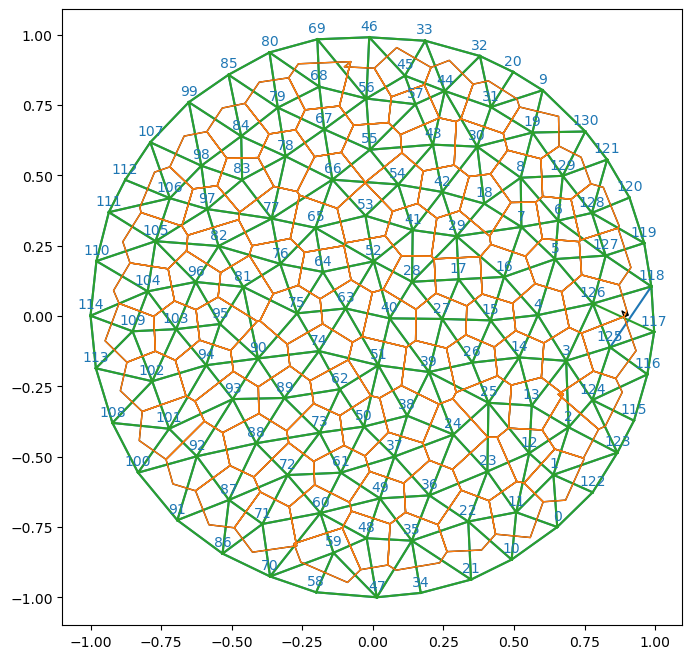
def can_flip_edges(
    hemesh:HeMesh
)->Bool[Array, 'n_hes']:
Check whether flipping half-edges would produce a valid mesh. Vectorized version of can_flip_edge. Returns a boolean array of length n_hes.
An edge can be flipped if the two opposite vertices are not already connected (which would create a duplicate edge, or, alternatively a cell with only 2 sides). Equilavently, both vertices of the edge must have more than 3 neighbors, except if the vertex lies on a boundary.
Boundary edges (heface == -1) cannot be flipped. For simulations in which the boundary needs to change, use the “infinity vertex” convention (boundary = all vertices adjacent to a vertex at infinity) to represent boundary edges. In this case, the mesh is (technically) closed and boundary edges can be flipped, just like any other interior edge. The can_flip_edge function will return True.
def can_flip_edge(
    hemesh:HeMesh, e:Union
)->Bool[Array, '']:
Check whether flipping half-edge e would produce a valid mesh. For a vectorized version, see can_flip_edges.
An edge can be flipped if the two opposite vertices are not already connected (which would create a duplicate edge, or, alternatively a cell with only 2 sides).
Boundary edges (heface == -1) cannot be flipped. For simulations in which the boundary needs to change, use the “infinity vertex” convention (boundary = all vertices adjacent to a vertex at infinity) to represent boundary edges. In this case, the mesh is (technically) closed and boundary edges can be flipped, just like any other interior edge. The can_flip_edge function will return True.
def iterate_around_vertex_n_times(
    hemesh:HeMesh, # The half-edge mesh.
    v:Union, # Vertex around which to iterate.
    n:Union, # Number of steps to iterate around the vertex. Under `jax.jit` it must be a static argument
(`jax.jit(iterate_around_vertex_n_times, static_argnames=['n'])`).
)->Int[Array, 'n']: # Indices of the half-edge reached after n steps (wraps around).
Move along half-edges around vertex v for n times, starting from incident.
Returns indices of the half-edge reached after n steps (wraps around). JIT-compatible due to fixed-length output (n needs to be set to static).
# all edges but the boundary can be flipped initially

assert can_flip_edge(hemesh, 100)
assert not can_flip_edge(hemesh, jnp.argmax(hemesh.is_bdry_edge))
# after flipping an edge incident to a vertex 3 times, the vertex has only 3 neighbors and cannot be flipped anymore
v = 67
flipped_hemesh = hemesh
assert can_flip_edge(flipped_hemesh, flipped_hemesh.incident[v])
assert can_flip_edges(flipped_hemesh)[flipped_hemesh.incident[v]]
for i in range(3):
e = flipped_hemesh.incident[v]
flipped_hemesh = flip_edge(flipped_hemesh, e=e)
assert not can_flip_edge(flipped_hemesh, flipped_hemesh.incident[v])
assert not can_flip_edges(flipped_hemesh)[flipped_hemesh.incident[v]]Simulation often need to carry out edge flips at every time step. The function flip_edge does a single edge flip by modifying the connectivity arrays, and is already JIT-compatible.
To carry out multiple flips, we must do them in sequence (otherwise, one risks leaving the mesh in an invalid state). The simplest approach is flip_all, which does a jax.lax.scan over all half-edges. This is JIT-compatible because the scan length is fixed (= number of half-edges), but can be slow for large meshes since it visits every edge even if only a few need flipping.
A more efficient alternative is flip_n_shortest, which sorts edges by length, selects the max_flips shortest candidates, and scans only over those. This is significantly faster (e.g., 100–110 μs for 10 flips vs. 600 μs for a full scan on a typical mesh). The max_flips parameter is a static argument: changing it triggers recompilation, but within a simulation it is typically constant. See tutorials/03_vertex_models for a full usage example with per-edge cooldowns.
def flip_by_id(
    hemesh:HeMesh, ids:Int[Array, 'flips'], to_flip:Bool[Array, 'flips']
)->HeMesh:
Flip half-edges from ids array where to_flip is True. Wraps flip_edge.
Flips are applied sequentially, and each one is re-checked against the current (partially flipped) mesh with can_flip_edge, since an earlier flip can invalidate a later one. Edges that fail the check are skipped.
If the same edge appears twice (or an edge and its twin), the function will apply both, undoing the first flip. Use to_flip to avoid this
def flip_by_score(
    hemesh:HeMesh, # The half-edge mesh.
    edge_score:Float[Array, 'n_hes'], # Per-half-edge edge scores (e.g., Delaunay criterion).
    threshold:float, # Edges with scores below this are flipped.
    max_flips:int=10, # Maximum number of edges to consider. Determines the scan length and hence array
shapes, so under `jax.jit` it must be a static argument
(`jax.jit(flip_n_shortest, static_argnames=['max_flips'])`).
)->tuple: # The mesh after flipping.
Flip up to max_flips edges whose edge_score is below threshold.
Sorts edges by score (e.g. Delaunay criterion), selects the max_flips lowest-scoring unique, non-boundary candidates, and flips those below threshold. Only flips unique half-edges (not their twins).
# load 2D mesh
mesh = TriMesh.read_obj("../test_meshes/disk.obj", dim=2)
hemesh = HeMesh.from_triangles(mesh.vertices.shape[0], mesh.faces)
geommesh = GeomMesh(mesh.vertices, mesh.face_positions)

# let's detect all edges with negative dual length, and flip them.
dual_lengths = geom.get_oriented_dual_he_length(geommesh.vertices, geommesh.face_positions, hemesh)
edges = jnp.where((dual_lengths < 0.0) & ~hemesh.is_bdry_edge & hemesh.is_unique)[0]
# we only want to flip unique hes!
edges, edges.size
Warning: readOBJ() ignored non-comment line 3:
o flat_tri_ecmc(Array([ 9, 185, 191, 335], dtype=int64), 4)to_flip = (dual_lengths < 0) & ~jnp.isnan(dual_lengths)
flipped_hemesh = flip_by_score(hemesh, edge_score=dual_lengths, threshold=0.0, max_flips=10)[0]assert igl.is_edge_manifold(flipped_hemesh.faces)[0]
assert igl.is_vertex_manifold(flipped_hemesh.faces)[0]flipped_hemesh = flip_by_score(hemesh, edge_score=dual_lengths, threshold=0.2, max_flips=10)[0]# no extra recompileflipped_geommesh = geom.set_voronoi_face_positions(geommesh, flipped_hemesh)fig = plt.figure(figsize=(8,8))
plt.triplot(*geommesh.vertices.T, hemesh.faces)
plt.triplot(*flipped_geommesh.vertices.T, flipped_hemesh.faces)
ax = plt.gca()
p1 = msh.cellplot(hemesh, geommesh.face_positions,
cell_colors=np.array([0.,0.,0.,0.]), mpl_polygon_kwargs={"lw": 1, "ec": "k"})
p2 = msh.cellplot(flipped_hemesh, flipped_geommesh.face_positions,
cell_colors=np.array([0.,0.,0.,0.]), mpl_polygon_kwargs={"lw": 1, "ec": "tab:orange"})
ax.add_collection(p1)
ax.add_collection(p2)
plt.axis("equal")
msh.label_plot(geommesh.vertices, hemesh.faces, fontsize=10, face_labels=False)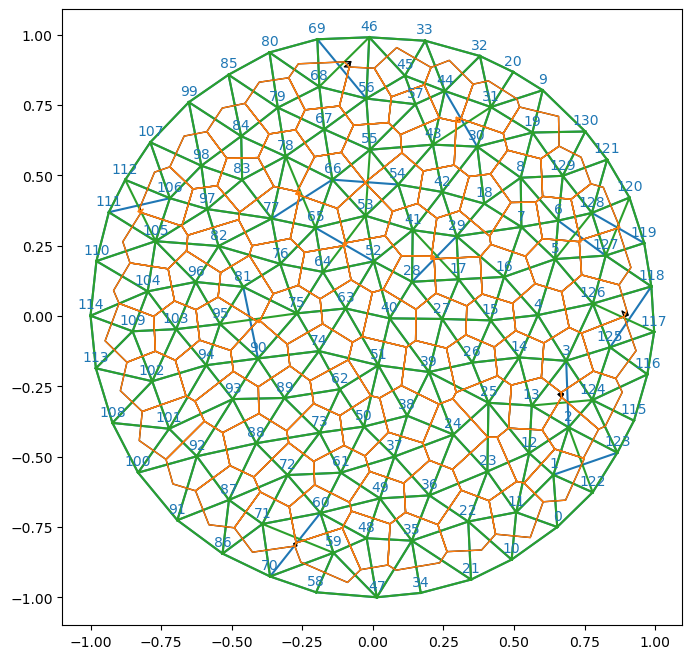
The edge flip is the only topological modification of a half-edge mesh that leaves the number of vertices, edges, and faces constant. This makes it especially compatible with JAX’s “static array size” paradigm.
However, biophysical processes like cell division, or remeshing algorithms, require changing the number of cells/vertices in a mesh. We implement two elementary operations, which are inverses of one another: edge collapse and vertex split.
To collapse a half-edge e in a hemesh:
hemesh.heface[e], hemesh.heface[hemesh.twin[e]]hemesh.orig[e], hemesh.dest[e]We must be careful to preserve the manifold structure of the mesh and deal with edge cases. We test the resulting half-edge mesh via plots and use libigl to verify that the mesh is in a valid state.
A data structure (MeshReindexMap) keeps track of how vertices/edges/faces of the initial mesh map to those of the modified one.
def remap_inds_removal_reverse(
    N:int, removed:Int[Array, 'n_removed']
)->Int[Array, 'N-n_removed']:
Remap indices after removal. Reverse of remap_inds_removal_forward.
def remap_inds_removal_forward(
    N:int, removed:Int[Array, 'n_removed']
)->Int[Array, 'N']:
Remap indices after removal. Returns array arr[i] = i - (removed < i).sum().
def MeshReindexMap(
    v_forward:Int[Array, 'n_vertices_old'], v_reverse:Int[Array, 'n_vertices_new'],
    f_forward:Int[Array, 'n_faces_old'], f_reverse:Int[Array, 'n_faces_new'], he_forward:Int[Array, 'n_hes_old'],
    he_reverse:Int[Array, 'n_hes_new'], info:dict=<factory>
)->None:
Old↔︎new index maps produced by topology-changing operations.
N = 10
removed = jnp.array([5, 2])
forward = remap_inds_removal_forward(N, removed)
reverse = remap_inds_removal_reverse(N, removed)

forward[6], reverse[2], jnp.allclose(forward[reverse], jnp.arange(N - removed.shape[0]))
(Array(4, dtype=int64), Array(3, dtype=int64), Array(True, dtype=bool))
def can_collapse_edge(
    hemesh:HeMesh, e:Union
)->Bool[Array, '']:
Check whether collapsing half-edge e would produce a valid mesh (link condition).
An edge can be collapsed if it is interior and the two endpoint vertices share exactly two common neighbors (the opposite vertices of the two adjacent faces). This is the discrete “link condition” that ensures the collapse preserves manifoldness.
Uses hemesh.is_bdry_edge, so boundaries are detected under both conventions (heface == -1 and vertices at infinity).
def collapse_edge(
    hemesh:HeMesh, e:Union
)->tuple:
Collapse half-edge e in a half-edge mesh. Keeps the origin vertex of e.
Returns a new HeMesh (does not modify in-place), and a MeshReindexMap for remapping vertex, half-edge, and face indices from the original mesh to the new mesh.
Warning: does NOT check whether the collapse produces a valid mesh. Use can_collapse_edge to check first.
Not jitted, and inherently awkward to jit: the output arrays are smaller than the input, so every call with a different mesh size triggers a recompilation. On a mesh with vertices at infinity it cannot be jitted at all, since inf_vertices is a static field whose remapping requires concrete indices.
# test on the existing example mesh. pick some interior, unique half-edge

candidates = np.where(np.asarray(hemesh.is_unique & (~hemesh.is_bdry_edge)))[0]
e_collapse = candidates[40]
print("Collapsing half-edge", e_collapse, "with vertices", int(hemesh.orig[e_collapse]), int(hemesh.dest[e_collapse]))

hemesh_collapsed, remap = collapse_edge(hemesh, e_collapse,)
vertices_collapsed =  geommesh.vertices[remap.v_reverse]
Collapsing half-edge 42 with vertices 8 129hemesh, hemesh_collapsed # removes 1 vertex, 6 half-edges, and 2 faces(HeMesh(N_V=131, N_HE=708, N_F=224), HeMesh(N_V=130, N_HE=702, N_F=222))# stil valid mesh
(msh.test_mesh_validity(hemesh_collapsed), igl.is_edge_manifold(hemesh_collapsed.faces)[0],
igl.is_vertex_manifold(hemesh_collapsed.faces)[0])(True, True, np.True_)8.85 ms ± 350 μs per loop (mean ± std. dev. of 7 runs, 100 loops each)# visualize before/after
fig, ax = plt.subplots(1, 2, figsize=(8, 4))
plt.sca(ax[0])
v1, v2 = (hemesh.orig[e_collapse], hemesh.dest[e_collapse])
plt.scatter(*geommesh.vertices[v1], c="tab:orange")
plt.scatter(*geommesh.vertices[v2], c="tab:orange")
plt.triplot(np.asarray(geommesh.vertices)[:, 0], np.asarray(geommesh.vertices)[:, 1], np.asarray(hemesh.faces), lw=0.5, color="k")
plt.title("before")
plt.axis("equal")
plt.axis("off")
plt.sca(ax[1])
plt.scatter(*geommesh.vertices[v1], c="tab:orange")
plt.triplot(np.asarray(vertices_collapsed)[:, 0], np.asarray(vertices_collapsed)[:, 1],
np.asarray(hemesh_collapsed.faces), lw=0.5, color="k")
plt.title("after collapse")
plt.axis("equal")
plt.axis("off")(np.float64(-1.10003475),
np.float64(1.09628575),
np.float64(-1.09934025),
np.float64(1.09050125))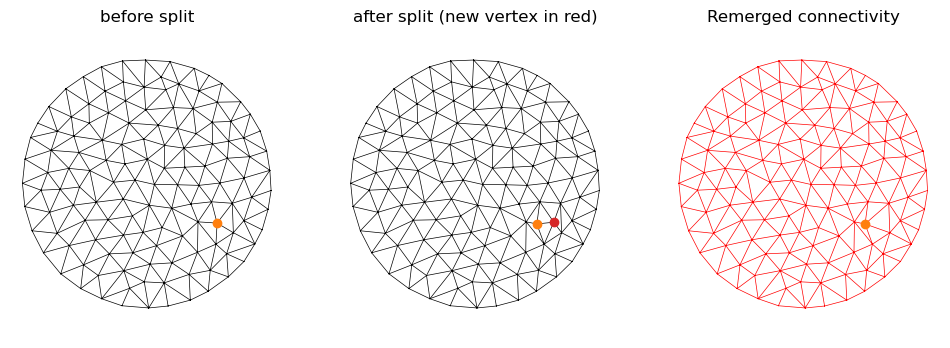
The opposite of edge collapse: splitting a vertex into two. We specify two half-edges (the “splitting axis”) that originate at a common vertex. Like before, we need a MeshReindexMap tracking how old and new mesh elements are related. New elements are appended at the end of the arrays.
def can_split_vertex(
    hemesh:HeMesh, e1:int, e2:int
)->bool:
Check whether splitting a vertex along half-edges e1 and e2 is valid.
Both half-edges must originate from the same vertex, and both must be on interior faces.
def split_vertex(
    hemesh:HeMesh, e1:int, e2:int, check_args:bool=False
)->tuple:
Split a vertex into two along a “splitting axis” given by two half-edges originating at that vertex.
New vertex inserted at origin of e2. The new vertex will be the final one in the array.
This function is not JIT-compatible, since it depends on iterating around the vertex to update origins/destinations.
# test split on the existing example mesh

# choose an interior vertex (avoid boundary) and two outgoing half-edges for split axis
v_split = jnp.where(~hemesh.is_bdry)[0][10]
v_new = hemesh.n_vertices  # new vertex index

ring = hemesh.iterate_around_vertex(v_split)
h1 = int(ring[0])
h2 = int(ring[len(ring)//2])
print("Splitting vertex", v_split, "axis hes", h1, h2)

hemesh_split, smap = split_vertex(hemesh, h1, h2)
print("Old:", hemesh, "new:", hemesh_split)
Splitting vertex 13 axis hes 56 407/Users/nc1333/miniforge3/envs/triangulax/lib/python3.14/site-packages/jax/_src/ops/scatter.py:108: FutureWarning: scatter inputs have incompatible types: cannot safely cast value from dtype=int64 to dtype=int32 with jax_numpy_dtype_promotion='standard'. In future JAX releases this will result in an error.
warnings.warn(Old: HeMesh(N_V=131, N_HE=708, N_F=224) new: HeMesh(N_V=132, N_HE=714, N_F=226)assert hemesh_split.n_vertices == hemesh.n_vertices + 1
assert hemesh_split.n_hes == hemesh.n_hes + 6
assert hemesh_split.n_faces == hemesh.n_faces + 2
F_split = np.asarray(hemesh_split.faces, dtype=np.int32)
print("edge manifold:", igl.is_edge_manifold(F_split)[0])
print("vertex manifold:", igl.is_vertex_manifold(F_split)[0])
print("Valid HE mesh:", msh.test_mesh_validity(hemesh_split))edge manifold: True
vertex manifold: True
Valid HE mesh: True# inverse consistency check: split then collapse the inserted edge
e_join = hemesh.n_hes+1 # error for 2*hemesh.n_vertices+1 ?
hemesh_back, back_map = collapse_edge(hemesh_split, e_join)
F0 = msh._canonical_faces_np(hemesh.faces)
F_back = msh._canonical_faces_np(hemesh_back.faces)
print("back to original counts?", hemesh_back.n_items == hemesh.n_items)
print("back to original faces?", np.array_equal(F0, F_back))
print("Valid HE mesh after collapse:", msh.test_mesh_validity(hemesh_back))back to original counts? True
back to original faces? True
Valid HE mesh after collapse: True# offset the new vertex slightly for visibility
vertices_split = np.concatenate([geommesh.vertices, geommesh.vertices[v_split][None, :]], axis=0)
d = trig.get_perp_2d(geommesh.vertices[hemesh.dest[h1]] - geommesh.vertices[hemesh.dest[h2]])
eps = 0.2
vertices_split[v_new] = vertices_split[v_new] + eps * d
vertices_split[v_split] = vertices_split[v_split] - eps * d
vertices_collapsed = vertices_split[back_map.v_reverse]# quick visualization (triangulation plot)
fig, ax = plt.subplots(1, 3, figsize=(12, 4))
plt.sca(ax[0])
plt.triplot(*geommesh.vertices.T, hemesh.faces, lw=0.5, color="k")
plt.scatter(*geommesh.vertices[v_split], c="tab:orange")
plt.title("before split")
plt.axis("equal"); plt.axis("off")
plt.sca(ax[1])
plt.triplot(*vertices_split.T, hemesh_split.faces, lw=0.5, color="k")
plt.scatter(*vertices_split[v_split], c="tab:orange")
plt.scatter(*vertices_split[v_new], c="tab:red")
plt.title("after split (new vertex in red)")
plt.axis("equal"); plt.axis("off")
plt.sca(ax[2])
plt.triplot(*vertices_collapsed.T, hemesh_back.faces, lw=0.5, color="r")
plt.scatter(*vertices_split[v_split], c="tab:orange")
plt.title("Remerged connectivity")
plt.axis("equal"); plt.axis("off")(np.float64(-1.10003475),
np.float64(1.09628575),
np.float64(-1.09934025),
np.float64(1.09050125))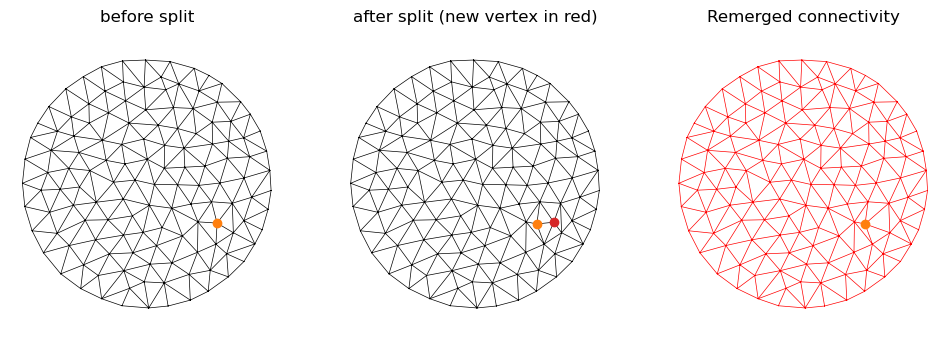
The following topological operations are not yet available in triangulax:
collapse_edge only handles interior edges.flip_by_score for edge flips.