In the TriMesh class, we represent a mesh a list of triangles. However, many common operations are difficult with this data structure. For example, how do you get all the neighbors of a given vertex, or compute the area of a dual cell?
For simulation and geometry processing, we need a different representation of the adjacency information. Typically, this is achieved by a half-edge mesh (HE) data structure. We represent the HE data structure by 3 sets of integer index arrays:
Vertices: 1 \((N_V,)\) array, whose entry for vertex \(i\) is an arbitrary HE incident on \(i\)
Edges: 6 \((2N_E,)\) arrays, [origin, dest, nxt, prv, twin, face] for each half-edge (face is undefined for boundary half-edges).
Faces, 1 \((N_F, 1)\) array, whose entry for face \(i\) is an arbitrary HE in \(i\). (Not to be confused with the \((N_F, 3)\) array of vertex IDs used previously).
Additionally, there are two float arrays for vertex and face positions, as previously. However, we split combinatorial and geometric information - a HeMesh class for the combinatorics, and a couple of regular arrays for the vertex positions, face positions, and vertex/half-edge/face attributes. The latter are packaged into a GeomMesh class. Together, the pair (GeomMesh, HeMesh) describes a mesh (like vertices/faces pair). A named tuple Mesh combines the two.
The first task is to create a helper function to plot mesh connectivity, and to create the half-edge connectivity matrices from the more conventional list-of-triangles format. The latter is somewhat involved.
For JAX compatibility, the mesh module uses jax.numpy instead of standard numpy for all numerical arrays, follows a functional programming style (no in-place mutation), and registers the HeMesh and GeomMesh dataclasses as JAX pytrees (this enables automatic differentiation and JIT-compilation with custom datastructures).
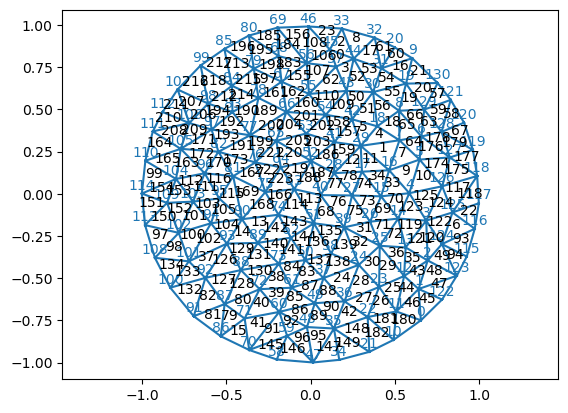
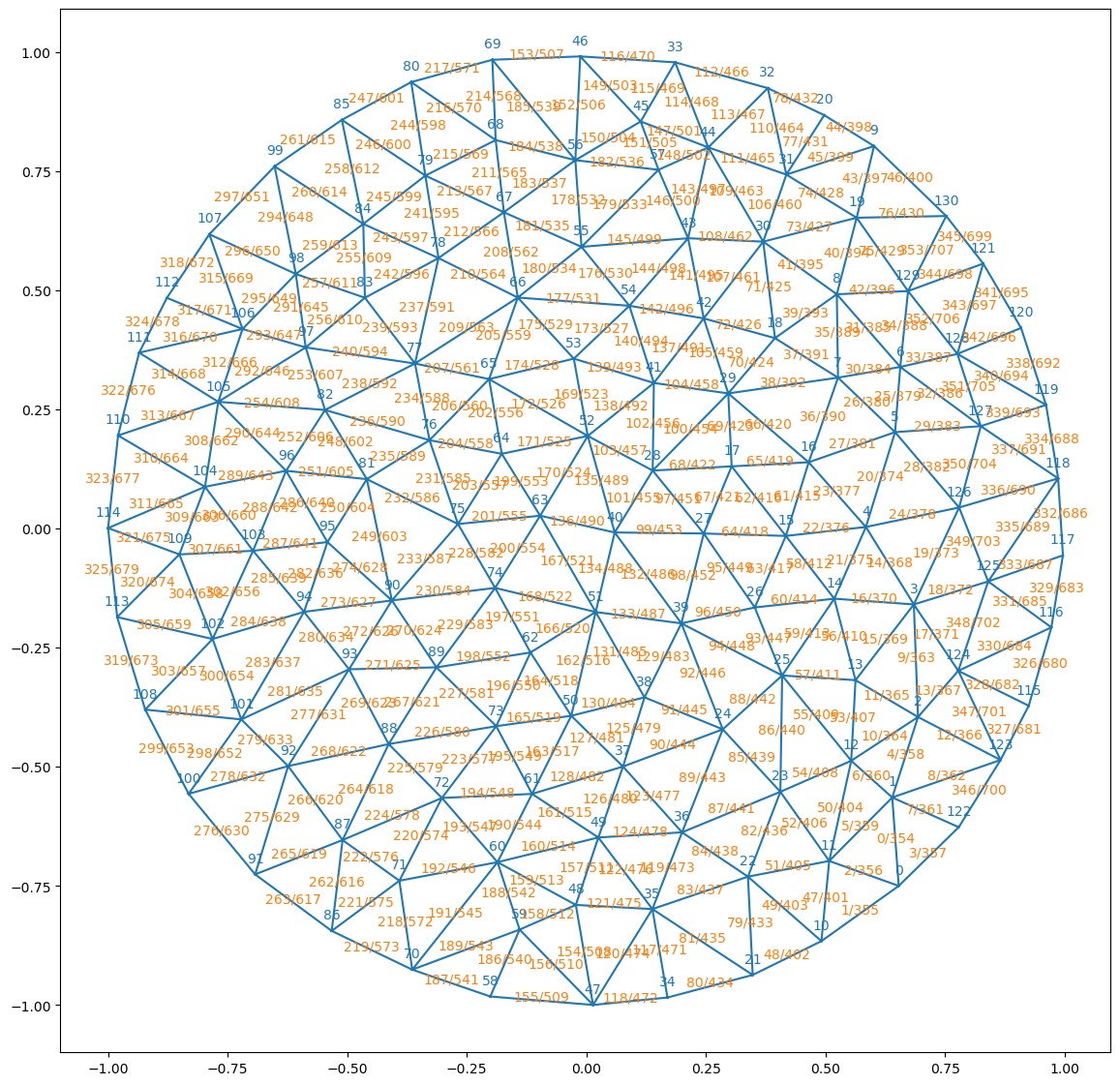
For debugging purposes. Plot triangular mesh with face/vertex labels in black/blue. If hemesh is not None, the connectivity info from it is used to plot the half-edge labels.
Warning: readOBJ() ignored non-comment line 3:
o Torus
Warning: readOBJ() ignored non-comment line 3:
  o flat_tri_ecmc
59.5 ms ± 968 μs per loop (mean ± std. dev. of 7 runs, 10 loops each)
# test vectorized vs reference implementation for two meshesmesh = TriMesh.read_obj("../test_meshes/disk.obj", dim=2)ref = get_half_edge_arrays(mesh.vertices.shape[0], mesh.faces)fast = get_half_edge_arrays_vectorized(mesh.vertices.shape[0], mesh.faces)print("Equal?", all([jnp.array_equal(a, b) for a, b inzip(ref, fast)]))mesh = TriMesh.read_obj("../test_meshes/sphere.obj")ref = get_half_edge_arrays(mesh.vertices.shape[0], mesh.faces)fast = get_half_edge_arrays_vectorized(mesh.vertices.shape[0], mesh.faces)print("Equal?", all([jnp.array_equal(a, b) for a, b inzip(ref, fast)]))
Warning: readOBJ() ignored non-comment line 3:
  o flat_tri_ecmc
Warning: readOBJ() ignored non-comment line 3:
  o Icosphere
Equal? True
Equal? True
1.08 ms ± 29.6 μs per loop (mean ± std. dev. of 7 runs, 1,000 loops each)
Half-edge mesh data structure for triangular meshes.
A half-edge mesh is described by a set of half-edges and several arrays that specify their connectivity (see full explanation in mesh module docs). This class serves as a container for multiple arrays. For compatibility with JAX, after initialization, do not modify these arrays in-place; always return a new HeMesh object. The mesh vertices may live in whatever dimension (or in periodic BC) - this does not affect the connectivity bookkeeping.
Half-edge meshes are initialized from a list of triangles and a number of vertices, and can return the original triangles (e.g., to save as a .obj).
All information and methods are purely “combinatorial”. The HeMesh class does not contain the vertex or face positions. These are saved in the GeomHeMesh class that combines a HeMesh (combinatorics) with a couple of other arrays (geometry).
Comparing two HeMeshes checks for equality of all arrays they contain, not for graph isomorphism (equivalence up to vertex renaming).
—Conventions—
For vertices, the incident half-edge points away from the vertex.
To describe the mesh boundary, there are two options: 1. Initialize from a triangulation with a boundary. Half-edges without a face (boundary) are assigned heface=-1. 2. Initialize from a triangulation without boundary, where certain vertices are “at infinity”. They should have coordinates [np.inf, np.inf]. Each infinity vertex corresponds to one boundary. For a single boundary, the vertex at infinity is, by convention, the final one. Mixing the two conventions will lead to errors.
Starting from a set of triangles, the half-edges are initialized as follows: The 1st N_edges half-edges are (origin_vertex, destination_vertex), in lexicographic order, with origin_vertex < destination_vertex. The 2nd N_edges are their twins, in the same order.
def test_mesh_validity( h:HeMesh, # Half-edge mesh to validate. verbose:bool=False, # Return diagnostic message.)->bool: # True if the mesh is valid. Also returns a string with a message if verbose = True
Test if a mesh is valid. Returns True if valid, optionally, returns message.
Checks both for consistency of the HeMesh datastructure AND whether the mesh is edge- and vertex manifold (defines a 2D surface).
Warning: readOBJ() ignored non-comment line 3:
  o flat_tri_ecmc
test_mesh_validity(hemesh)
True
# hemeshes can be compared for equality and are registered as pytreesleafs, ts = jax.tree_util.tree_flatten(hemesh)assertlen(leafs) ==8# the 8 connectivity arraysassert jax.tree_util.tree_unflatten(ts, leafs) == hemeshassert hemesh == hemeshassertnot (hemesh =="not a mesh")# equality must be EXACT: these are integer index arrays, so a tolerance-based# comparison would silently accept an off-by-one index on a large mesh.corrupted = HeMesh(hemesh.incident, hemesh.orig, hemesh.dest, hemesh.twin.at[0].set(hemesh.twin[0] +1), hemesh.nxt, hemesh.prv, hemesh.heface, hemesh.face_incident, hemesh.inf_vertices)assertnot (hemesh == corrupted)hemesh
HeMesh(N_V=131, N_HE=708, N_F=224)
# test iteration around vertexhemesh.dest[hemesh.iterate_around_vertex(69)], hemesh.orig[hemesh.iterate_around_vertex(56)]
# here is how you would do traversal of vertex neighbors with jax.lax. In JAX, the output size needs to be fixed# ahead of time, so this requires padding and setting a cap on vertex valence (inefficient and error-prone).self= hemeshmax_valence =10v =10initial = jnp.hstack([jnp.array([self.incident[v]]), -1*jnp.ones(max_valence-1, dtype=int)])jax.lax.fori_loop(1, max_valence, lambda i, x: x.at[i].set(self.twin[x[i-1]]), initial)
By using the arrays of a half-edge meshes to index vertex- or face-positions (in increasingly complex ways), we can compute all sorts of quantities of interests associated with a mesh, for example the edge lengths.
So far, our mesh representations TriMesh and HeMesh work for triangular meshes with and without boundary. In the HeMesh class, boundary half-edges are assigned to a fictitious -1 face. This convention has a downside. It is not possible to modify the boundary loop of the mesh by edge flips - doing so would result in an invalid state. In a simulation, this artificially limits the mesh’s ability to deform. Instead, we can add “vertices at infinity” and connect all edges in a given boundary to \(\infty\). This turns the mesh into a topological sphere. Now, one can flip boundary edges without the overall number of half-edges changing (so the array shape stays the same). Multiple boundaries are also supported. Each boundary corresponds to a distinct \(\infty\)-vertex (for example, 2 for a cylinder).
The coordinates of the fictitious vertices are set to [np.inf, np.inf] by convention. The boundary is found by iterating around \(\infty\). By convention, \(\infty\)-vertices, if they exist, are the final vertices of the mesh (don’t rely on this - implementation detail).
We generally assume that the mesh has only a single connected component.
The HeMesh class can deal with both the -1-face and the \(\infty\)-vertices conventions. The latter are listed in the inf_vertices attribute of a HeMesh.
# to get back the original faces/vertices, do this:_ = hemesh_infty.faces[~hemesh_infty.is_inf_face]# if you want to re-index the triangles so they only refer to non-infinity vertices:_ = igl.remove_unreferenced(new_vertices, np.asarray(hemesh_infty.faces[~hemesh_infty.is_inf_face]) )
# the "vertex at infinity" convention must agree with the heface == -1 conventionassert test_mesh_validity(hemesh_infty)assert (hemesh.is_bdry == (hemesh_infty.is_bdry[:-1] >0)).all()assert hemesh_infty.has_inf_vertex andnot hemesh.has_inf_vertex# boundary loops must have the same vertices AND the same orientation under both# conventions (the inf-vertex traversal runs the other way round and is reversed)loop_a, loop_b = np.asarray(hemesh.bdry_loops[0]), np.asarray(hemesh_infty.bdry_loops[0])assertset(loop_a) ==set(loop_b)shift = np.where(loop_b == loop_a[0])[0][0]assert (np.roll(loop_b, -shift) == loop_a).all(), "boundary loop orientation differs between conventions"
Topological summary
These are combinatorial invariants of the connectivity: they take a HeMesh and return a plain Python int/bool. They are host-side helpers (not jittable), which is fine since connectivity is static. Fictitious faces and vertices from the “vertex at infinity” boundary convention are excluded, so both boundary conventions give the same answer.
Genus of the surface, from chi = 2n_components - 2genus - n_boundary_loops.
0 for a sphere or disk, 1 for a torus. Assumes an orientable mesh (which the half-edge construction guarantees). Raises if the result is not an integer, which indicates an invalid mesh.
Mesh geometry (vertex and face positions) and per-mesh-item (per-face, per-half-edge, per-vertex) variables are combined into a second data class, the GeomMesh.
Data class for holding mesh geometry and mesh-associated variables. To be combined with a HeMesh to specify the connectivity.
One array (for vertex positions) must always be present. A second, optional, standard entry is a set of positions for each face. The mesh coordinates can live in any dimension
Optionally, vertices, half-edges, and faces can have attributes (stored as dictionaries). The keys of the dictionary should be taken from a suitable ‘enum’. The values are ndarrays, whose 0th axis is (vertices/edges/faces). These attribute dicts are initialized empty and can be set afterwards.
Unlike HeMesh, this class is intentionally not frozen. Vertex positions and per-mesh attributes may be updated directly (e.g. during a simulation step), whereas mesh connectivity (HeMesh) should never be edited by hand.
This class stores no element counts of its own: the number of vertices, half-edges, and faces belongs to the HeMesh. Use check_compatibility(hemesh) to confirm a geometry and a connectivity match.
In simulations, we will often want to attach extra information to a mesh’s vertices/edges/faces. In the GeomMesh class, these are saved in three dictionaries, vertex_attribs, he_attribs, face_attribs. Each key/value pair represents one property (for example, the cell target area). All values are arrays, and the first axis corresponds to the number of vertices/half-edges/faces, respectively. To keep track of the possible attributes, we use IntEnum’s as keys (this also ensures keys are hashable, as required by JAX).
Warning: readOBJ() ignored non-comment line 3:
  o flat_tri_ecmc
# this is how you set up an enum. It is important to use IntEnum, so we can _order_ the enums.# The precise Enum you will use depends on your application.class VertexAttribs(IntEnum): TARGET_AREA =1 TARGET_PERIMETER =2class HeAttribs(IntEnum): EDGE_TENSION =1class FaceAttribs(IntEnum): FACE_AREA =1
# you can iterate over enums, and they are hashable. The latter is essential for JAX!print([a for a in VertexAttribs])# there are multiple ways to access enum entries:hash(VertexAttribs.TARGET_PERIMETER), HeAttribs.EDGE_TENSION, HeAttribs['EDGE_TENSION'], HeAttribs.EDGE_TENSION.name
In our simulations, we may want to “batch” over several initial conditions/random seeds/etc. (analogous to batching over training data in normal ML). JAX can efficiently and concisely vectorize operations over such “batch axes” with jax.vmap.
To batch over our custom data structures, we need to convert a list of HeMesh/GeomMeshe instances into a single mesh with a batch axis for the various arrays. Luckily, this can be done using JAX’s pytree tools. The resulting meshes have an extra “batch” axis in all their arrays.
Stack a sequence of identical-structure pytrees along a new axis.
## Let us create a bunch of meshes with different initial positions and see if we can batch over them using vmapkey = jax.random.key(0)sigma =0.02batch_geom = []batch_he = []for i inrange(3): key, subkey = jax.random.split(key) random_noise = jax.random.normal(subkey, shape=geommmesh.vertices.shape) batch_geom.append(dataclasses.replace(geommmesh, vertices=geommmesh.vertices+sigma*random_noise)) batch_he.append(copy.copy(hemesh))
# define a test function to appy over the batchdef test_function(geommesh: GeomMesh, hemesh: HeMesh) -> Float[jax.Array, " n_vertices"]:"""Dummy test function."""return jnp.ones(hemesh.n_vertices)
# naive batching does not work. JAX needs a "struct-of-arrays", but a list of HeMeshes is an "array-of-structs"# see https://stackoverflow.com/questions/79123001/storing-and-jax-vmap-over-pytreestry: jax.vmap(test_function)(batch_geom, batch_he)exceptValueErroras e:print("Expected error:", e)
Expected error: vmap got inconsistent sizes for array axes to be mapped:
* most axes (21 of them) had size 708, e.g. axis 0 of argument geommesh[0].he_attribs[<HeAttribs.EDGE_TENSION: 1>] of type float64[708];
* some axes (12 of them) had size 131, e.g. axis 0 of argument geommesh[0].vertices of type float64[131,2];
* some axes (6 of them) had size 224, e.g. axis 0 of argument geommesh[0].face_positions of type float64[224,2]
# instead, we use a jax.tree.map to "push" the list axis into the underlying arrays.# the resulting meshes have an extra batch dimension in all of their arrays.batch_he_array = tree_stack(batch_he)batch_geom_array = tree_stack(batch_geom)batch_he_array, batch_geom_array, batch_geom_array.vertices.shape
# now it works! The result is a single object with batch axisbatch_out =jax.vmap(test_function)(batch_geom_array, batch_he_array)batch_out.shape
(3, 131)
# we can unpack things again into a list of meshesisinstance(tree_unstack(batch_out), list)
True
Saving to disk
We save and load TriMesh meshes as standard .obj files (with the hack of using vn lines for the face positions). The HeMesh class is basically a collection of arrays, which we can save to disk using numpy.
# test GeomMesh save/load round-trip with IntEnum keysclass _TestVA(IntEnum): A =1 B =2class _TestHA(IntEnum): C =1mesh = TriMesh.read_obj("../test_meshes/disk.obj", dim=2)hemesh = HeMesh.from_triangles(mesh.vertices.shape[0], mesh.faces)gm = GeomMesh(mesh.vertices, mesh.face_positions, vertex_attribs={_TestVA.A: jnp.ones(hemesh.n_vertices), _TestVA.B: jnp.zeros(hemesh.n_vertices)}, he_attribs={_TestHA.C: jnp.ones(hemesh.n_hes)})outfile = TemporaryFile()gm.save(outfile)_ = outfile.seek(0)# with enum classes: keys round-trip as IntEnum membersgm_loaded = GeomMesh.load(outfile, vertex_attribs_enum=_TestVA, he_attribs_enum=_TestHA)assertall(isinstance(k, _TestVA) for k in gm_loaded.vertex_attribs), "vertex keys not IntEnum"assertall(isinstance(k, _TestHA) for k in gm_loaded.he_attribs), "he keys not IntEnum"assert gm == gm_loaded, "loaded GeomMesh not equal to original"# without enum classes: keys are strings (backward compat)_ = outfile.seek(0)gm_str = GeomMesh.load(outfile)assertall(isinstance(k, str) for k in gm_str.vertex_attribs), "expected string keys"print("GeomMesh save/load round-trip OK")
GeomMesh save/load round-trip OK
Warning: readOBJ() ignored non-comment line 3:
  o flat_tri_ecmc